Maropost Marketing Cloud vs. Mailchimp 2026
Quick comparison at a glance
Bottom line: Mailchimp is the entry-level platform. Marketing Cloud is how you scale once bulk email, inbox placement, and eCommerce personalization decide revenue.
| Criteria | Maropost | Mailchimp |
|---|---|---|
| Core product | Marketing Cloud: email, SMS, and push on one ESP | Starter email marketing tool with SMS and social add-ons |
| Best for | Email marketing for eCommerce and enterprise senders | Email marketing for small business and simple newsletter programs |
| Key differentiator | Built for growing eCommerce brands: email and SMS on shared customer and order data, with high-capacity sending | Built for beginners: ease of use, newsletter software, and a large self-serve app ecosystem |
| Integrations | Native Salesforce two-way sync, Shopify and WooCommerce-ready eCommerce, webhooks, APIs | Large marketplace; Salesforce and store connectors with more basic sync |
| Support | 24/7 chat on every plan; dedicated success and deliverability managers on higher plans | Email/chat on paid plans; phone and onboarding on Premium |
| Plan model | Tiers by send volume and included automations | Tiers by stored contacts, including unsubscribed contacts unless archived |
| Starting price | Essential from $251/month | Free plan; paid plans from $13/month (Essentials) |
Plan callout: Marketing Cloud: Essential, Professional, and Enterprise. Mailchimp: Free, Essentials, Standard, and Premium. Feature access, send limits, and add-ons change by tier.
The main difference
What is the main difference between Maropost and Mailchimp email marketing?
You can send email on both. The gap shows up when high-volume brands hit the ceiling of starter software.
Both email marketing tools give you a drag-and-drop email builder, forms, A/B tests, store connections, and automations. Both cover list growth, campaign sends, and reporting.
The split sits in three places: email deliverability tools, whether product content stays accurate after send, and whether email workflow automation moves data and channels or only fires messages.
What is Maropost
One platform for email, SMS, and lifecycle email marketing, connected to everything else you run on Maropost. Fast-growing retailers get campaigns, automations, SMS, and catalog-driven personalization on dedicated IP routing built for large databases, not shared starter queues. Built for scaling and high-capacity sending.
At a glance
What is Mailchimp
Starter email marketing software. Newsletter software, popups, and customer automations launch quickly, with a free tier and contact-based plans. Advanced controls such as dedicated IPs, transactional SMTP, inbox placement testing, browse abandonment, and live catalog updates are limited, add-on, or missing. Built for beginners. Basic sending access.
At a glance
The real difference: start sending vs. scale sending

Mailchimp moves you from account creation to first campaign. Shared IPs, standard send queues, and simpler automation capabilities are designed for newsletter sends and basic lifecycle marketing.

Built for brands that have outgrown starter email marketing software. Dedicated and pre-warmed IPs, ISP-aware throttling, open-time product swaps, in-inbox interactive email, and email, SMS, and push automations sit in the core product. Not a later upgrade path.
Structural differences to keep in mind:
- Plan model: Marketing Cloud tiers follow send volume and included automations. Mailchimp tiers follow stored contacts, so inactive and duplicate profiles count until you archive them.
- Send path: Marketing Cloud includes exclusive sender IPs, priority queues, and pre-send spam and placement checks. Mailchimp runs most accounts on shared IPs, with dedicated IPs and Mandrill transactional mail as paid extras.
- Commerce logic: Marketing Cloud updates product content at open time and triggers cart and browse abandonment in one engine. Mailchimp locks product suggestions at send time and does not natively track abandoned browse.
Market context
Why this email marketing platform comparison matters
You’ve outgrown the first email tool. The list grew. Automations sit behind a higher tier. Shared-IP sending and starter flows no longer cover the work.
Mailchimp vs. Maropost searches rise at that point in an email marketing software comparison. Segmentation stays shallow. Send and flow caps show up. Deliverability issues on shared IPs get risky. SMS and transactional mail sit on add-ons. That is the ceiling: marketing automation, not newsletters alone.
If you run email marketing for eCommerce or retail, skip which name is bigger. Ask what the next 12 months look like: a bulk newsletter email on a small list, or high-volume email marketing where inbox placement, catalog accuracy, and which features sit in the core product decide the stack. Most growing online stores, including those on Shopify and WooCommerce, hit this fork as soon as cart recovery and bulk send volume become the job.
Head-to-head email marketing software comparison
Email marketing features and capabilities
Marketing Cloud lets teams save complex layouts once and reuse them across campaigns, pulling blog feeds, news, and product releases into scheduled templates, and swapping catalog items at open time if inventory moves after send. Mailchimp’s Classic and New builders move faster on a simple email template builder; RSS campaigns and AI product suggestions are locked at send, and custom HTML lives in Mailchimp’s Code Your Own area, typically on Standard and higher.
| Feature | Maropost | Mailchimp |
|---|---|---|
| Email drag-and-drop builder | Advanced, highly flexible canvas | Basic structural block builder |
| Inbox view previews | Built-in live testing for 50+ email apps | Requires a paid add-on (via Litmus) |
| Auto-publish emails | Fully automatic publishing from content feeds | Standard manual scheduling only |
| Smart A/B split testing | Tests multiple variations with real-time logic | Limited to subject line and basic content splits |
| Website popups | Triggers based on deep customer value data | Standard forms based on simple behaviors |
| Embedded sign-up forms | Direct website integration | Raw HTML for custom styling |
| Dynamic product feeds | Real-time product catalog sync | Standard, slower eCommerce store sync |
| Custom HTML editor | Unrestricted custom code engine | Custom raw code uploads |
| Developer HTML workspace | Live, split-screen code editing workspace | Includes a built-in code editor |
| Interactive email (AMP) | Native support for live, interact-in-box emails | Supports standard static HTML only |
Email deliverability and performance
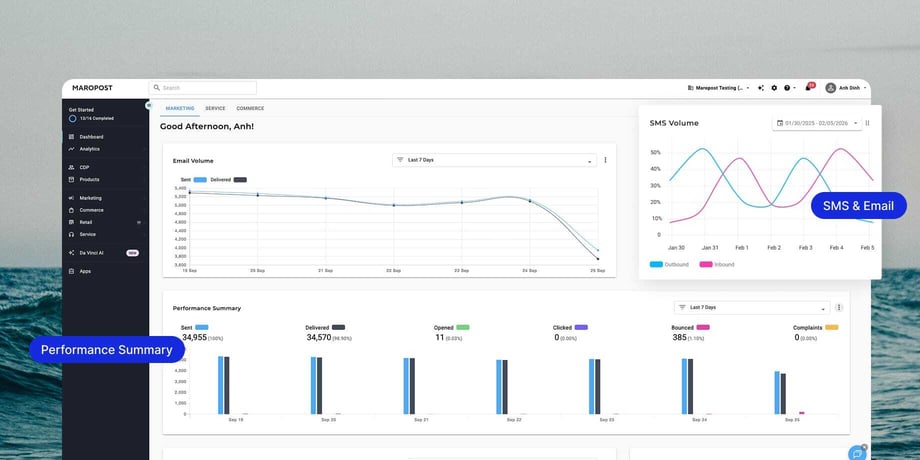
This is the clearest enterprise gap in email deliverability tools. Marketing Cloud sends high volume on dedicated IPs, with live ISP throttling, seed-list placement tests, and native transactional SMTP. Mailchimp’s shared network covers a regular email blast; dedicated IPs, Mandrill transactional mail, and deep spam or placement testing are Premium, add-on, or third-party.
| Feature | Maropost | Mailchimp |
|---|---|---|
| Dedicated IP routing | Exclusive, private sender IPs included | Only available as a paid Premium add-on |
| Smart delivery speed | Automatically adjusts speed to bypass spam filters | Standard delivery speed with no active tuning |
| Pre-send safety check | Fixes delivery mistakes before the email goes out | Basic, high-level checklist before sending |
| Automated list cleaning | Automatic daily removal of dead/unengaged emails | Requires manual archiving and cleaning |
| Custom sending domains | Simple domain setup | Standard, manual DNS verification setup |
| Inbox placement testing | Tests where emails land before blast sending | Requires a separate third-party tool |
| Smart spam checker | Strong built-in filter to flag spam elements | Basic formatting and link checks only |
| Transactional email delivery | Native SMTP built in | Requires a separate Mandrill paid add-on |
| List bombing protection | Built-in bot defenses on your sign-up forms | Requires turning on a Google reCAPTCHA toggle |
| Priority send queue | Critical emails skip to the front of the line | First-come, first-served sending queue |
| Secure sign-up verification | Clean, native subscriber sign-ups | Standard double opt-in validation rules |
| Apple Mail bot filtering | Filters out fake Apple privacy opens from data | Shows raw opens without filtering fake clicks |
| Ready-to-send warm IPs | Pre-warmed IPs so you can scale immediately | Requires a slow, manual warm-up process |
Email marketing automation and workflow logic
Marketing Cloud can update inventory, CRM tags, or store data in the background without sending a message first — built for automated email marketing as a system, not a blast calendar. Mailchimp’s Customer Journey Builder is built around messaging the contact: abandoned cart email is native, abandoned browse is not.
| Feature | Maropost | Mailchimp |
|---|---|---|
| Advanced background workflows | Changes data behind the scenes with unlimited logic | Focused almost entirely on sending emails |
| Instant action triggers | Reacts instantly to store behaviors with zero delay | Suffers from slight webhook and API delays |
| All-in-one multi-channel support | Sends SMS, email, and mobile push in one path | Requires third-party apps to connect channels |
| Cart and browse abandonment | Triggers for both abandoned carts and viewed items | Cart abandonment only; no native browse tracking |
| Isolated brand workspaces | Keeps separate brands or departments fully split | Requires completely separate, isolated accounts |
| Salesforce native integration | Deep, two-way sync updates data both ways | Basic, one-way contact syncing only |
| Custom webhooks | Unlimited data routing to external systems | Standard outbound webhooks only |
| Global 1-click unsubscribe | Instantly removes opt-outs across all lists | Standard unsubscribe links placed in footers |
| Timezone-safe SMS routing | Rotates messages or falls back to email automatically | Pauses the automation step until the window opens |
| Dynamic preference centers | Advanced, multi-layered sign-up preference pages | Basic topic check-boxes and audience groups |
Email personalization and AI intelligence
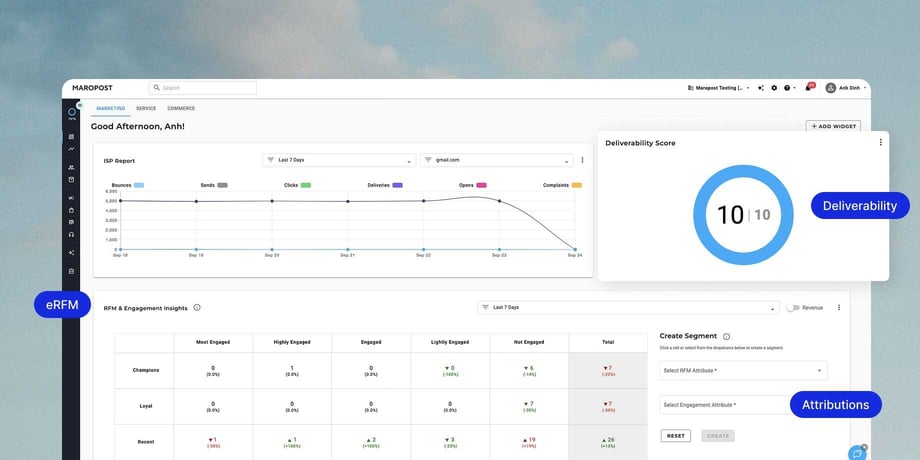
Personalize from connected data tables, eRFM shopper-value scores, and conversion windows — when someone is likely to buy, not only when they are likely to open. Mailchimp’s send-time optimization is strong for batch campaigns and A/B tests; it is not a live step inside Customer Journeys.
| Feature | Maropost | Mailchimp |
|---|---|---|
| Relational data personalization | Pulls from complex, deeply connected data tables | Relies on flat, standard profile text tags |
| Conversion-time optimization | Delays sends until a customer is most likely to buy | Delays sends based on when a customer likely opens |
| Shopper value profiles | Scores shoppers mathematically on buying behavior | Groups contacts into broad, hidden value buckets |
| Live open-time content | Updates images/timers the second an email is opened | Requires external third-party HTML code |
| Custom tags and relational fields | Unlimited complex data styling and tagging | Uses standard, flat audience tag fields |
| Predictive inbox timing | Learns exactly when an individual clicks and engages | Standard tool optimized around batch campaigns |
Email marketing reporting and revenue attribution
Both platforms overlay click maps and append UTM tags for Google Analytics. Marketing Cloud’s email analytics software is built for analysts who need offline POS attribution, cohort views, and unrestricted raw exports. Mailchimp’s Analytics AI answers plain-English questions, with tighter export limits and a digital-store attribution model.
| Feature | Maropost | Mailchimp |
|---|---|---|
| Complete revenue tracking | Connects physical store checkouts to online ads | Connects digital store checkouts only |
| Executive analytics views | Direct, raw database reporting access | Conversational text-based AI chatbot view |
| Advanced audience grouping | Tracks and compares complex custom user groups over time | Compares basic, individual campaign reports |
| Visual click tracking | Visual click overlay directly on the email layout | Standard layout click-maps included |
| UTM and web analytics sync | Automatically appends deep tracking links | Standard Google Analytics link appending |
| Exportable raw data feeds | Unlimited direct connection to data warehouses | Limits exports to one generation every 24 hours |
Plans & tiers
Pricing that scales differently.
Marketing Cloud tiers follow send volume and included automations. Mailchimp tiers follow stored contacts.
Maropost — from $29/mo
Mailchimp — free, then from $13/mo
Free
$0
- 250 contacts · 500 emails/mo
- 1 user · basic builder
- No multi-step automation
Essentials
$13/mo
- Testing & scheduling
- 3 users · 50k contacts
- No multi-step automations
Standard
Tiered
- Customer Journeys, send-time optimization, and dynamic content
- 5 users · 100k contacts
- Click maps and comparative reports
Premium
Tiered
- Phone, onboarding, and multivariate testing
- Unlimited users and up to 200,000 contacts
- Dedicated IP as an add-on for qualifying volume
- SMS and Mailchimp Transactional (Mandrill) remain separate add-ons
Customer reviews and independent rankings
Maropost reviews mention inbox placement, eCommerce segmentation, and email plus SMS in one platform.
On G2: 4.4/5 vs. Mailchimp's 4.3/5, with quality of support at 9.0 vs. 8.0.
4.4/5
Maropost on G2 (~157 reviews)
9.0
Quality of support (vs. 8.0)
157+
Maropost reviews on G2
High Performer
G2 category: automation, personalization, eCommerce
| Source | Maropost | Mailchimp |
|---|---|---|
| Trustpilot / review site | Limited public sample (not a primary ranking source) | Large public review footprint; scores vary by site |
| G2 / Capterra | G2 4.4/5 (about 157 reviews); Capterra about 3.9–4.0/5 (15 reviews) | G2 4.3/5 (17,000+ reviews); Capterra 4.5/5 (17,000+ reviews) |
| Category ranking | eCommerce / enterprise Marketing Cloud specialist | Email marketing category leader by awareness and review volume |






Implementation and onboarding
Maropost onboarding
Timeline: guided migration available. Professional and Enterprise include training and a customer success manager.
- Export audiences, templates, and suppression data from Mailchimp
- Import via CSV (or partner-led migration) into Maropost lists and relational fields
- Authenticate sending domains, assign IPs, and rebuild priority automations (welcome sequences, abandoned cart, browse, replenishment)
Contracts run 12 months. Dedicated IPs, catalog sync, and Salesforce or POS connections are a real implementation — not a same-day self-serve switch.
Mailchimp onboarding
Timeline: same day for a basic account. Standard includes a 14-day trial. Premium adds personalized onboarding sessions.
- Create an audience, connect a store
- Pick a template, send
- Domain authentication is a manual DNS step on paid plans. Dedicated IP warmup, if you qualify, takes weeks
That speed is the product. The same simplicity that gets campaigns out quickly can become a constraint as volume and complexity grow.
Final verdict
Which should you choose?
Choose Maropost if…
- You send high volume and need dedicated or pre-warmed IPs instead of a shared pool
- You need cart and browse abandonment, open-time product feeds, and conversion-window send timing
- You want email and SMS plus mobile push in one automation, with timezone-safe SMS fallback to email
- You run more than one brand and need isolated workspaces under one login
- You need native transactional SMTP and two-way Salesforce sync without extra middleware
- You want send-volume tiers and included automations, not a plan that grows with every stored (including inactive) contact
Best for: The best email marketing platform for eCommerce and enterprise once Mailchimp’s ceiling shows up. A strong ESP recommendation for Shopify email and WooCommerce stores that need a high-volume ESP, not another newsletter tool.
Choose Mailchimp if…
- You need a free tier or a low starting price to send newsletters this week
- Your list is small, your automations are simple, and shared-IP sending is enough
- You want the largest template and app marketplace with a beginner-friendly builder
- You do not need browse abandonment, AMP email, priority send queues, or POS-to-email attribution
Best for: Best email marketing for small business and startups, plus best free email marketing if you need an easy email marketing service. Enough for email marketing for newsletters. Not yet a high-volume revenue channel.
The bottom line
Mailchimp is a strong way to start. Easy to learn. A free tier and a low Essentials starting price. Enough for newsletter software, popups, and basic automations.
It gets limited as contacts, SKUs, and send volume grow. Automation and phone access are tiered. Transactional mail and dedicated IPs sit on add-ons. Open-time catalog, browse abandonment, and native push are missing or third-party.
Marketing Cloud is the stronger choice in this Maropost vs. Mailchimp email marketing matchup when email is a revenue channel — especially for retail teams that need email marketing automation, deeper personalization, and email plus SMS without stacking add-ons.
If you are comparing Mailchimp vs. Maropost because you already feel the ceiling, this is the next phase.