
If you're trying to run email campaigns, a normal mailbox won't get you far. A mailbox is built to read and reply. Software for email marketing is built so you can create, target, send, automate, and measure those campaigns.
Most products come with a long list of features. But more features aren't necessarily better. What matters is whether they match what your business actually needs to do.
People looking for the best email marketing software will also come across the term best email marketing services. Here, we're using both to mean software that runs campaigns, rather than an agency that sends email for you.
By the end, you should be able to look at any feature list and know what matters for your campaigns, what doesn't, and why.
Key takeaways
- The features that matter are the ones that help you create, target, send, automate, and measure campaigns.
- Contacts, unsubscribes, and suppression belong in the same product as the editor. A stored address isn't consent, and an opt-out has to stay off later sends.
- Permission-based sending, list hygiene, and authentication you can confirm with the vendor matter as much as the send itself.
- Reports should tell you more than opens and clicks. Delivery, bounces, and unsubscribes come first; opens and clicks help next to those.
The core capabilities of email marketing software
If you choose email marketing software by the capabilities it has to cover, you can tell which features of email marketing software do real campaign work and which only fill a list. Treat an email marketing tool as software that has to cover that work.
Look for software that can do all of this:
- Create campaigns. Put the details, the audience, and the content together.
- Send and schedule. Send now, or send at a time you choose.
- Manage contacts and lists. Keep subscribed people in the system and group them so you can reuse an audience.
- Target. Send to a specific audience instead of the whole file.
- Handle opt-outs. Record when someone asks to stop, and keep those contacts off later sends.
- Personalize. Use contact data you already have in the message.
- Automate. Run welcome, follow-up, and other repeating sends after you set them up.
- Report. Show delivery, bounces, unsubscribes, and engagement so the next send can change.
If a product can't cover these core capabilities, a longer feature list won't make up for what's missing.
Create and send campaigns
Creating and sending is the first capability to look at closely. Can your team write the email, reuse a design, check the message, send a test, pick a time, and send it to the right people?
Editor and templates
The people who write campaigns need a way to finish the email inside the product. Some teams work visually. Some work in code. What matters is whether the editor fits the way your team works.
Reusable templates matter more when you're sending campaigns regularly. Look for a way to save email content and use it again, so each send doesn't start from a blank page.
Preview and test sends
Preview lets you check the campaign before you send, while test sends put a copy in front of a few people on your team. Use both to catch issues with the content and presentation before the campaign goes to your list. Keep in mind that neither can guarantee how the message will display or whether it will reach the inbox for every recipient.
Schedule and send to the right list
You should be able to send immediately or schedule a later send, so you control when the campaign goes out.
The campaign should go to a chosen audience. Look for a way to select lists or other groups, and a way to leave people out of that send when they shouldn't get it.
Before you send, have the audience ready as a list or similar grouping, and have the email content ready. The campaign needs both attached.
Manage contacts, lists, and consent
Look for software that lets you manage contacts as well as campaigns. You should be able to organize people into the right audiences and keep anyone who opts out off future sends.
Subscribed contacts and lists
Campaigns depend on people who asked to hear from you. Being stored as a contact, or sitting on a list, doesn't make someone a subscriber, so look for a way to see that status in the product.
Lists are how most products store those contacts so you can send to a chosen group. You should be able to add people one at a time or in bulk, and keep a clear record of how they got onto the list. Importing addresses isn't permission. Look for lists you can send to, and for lists or suppression groups you can exclude.
Unsubscribes and suppression
People should be able to leave a list they no longer want, and they should be able to say they don't want mail from the account at all. Those are different requests.
Suppression is what happens next. Look for a way to keep someone off later communications after they unsubscribe, report spam, ask never to be mailed again, or hard-bounce. Check whether that suppression covers the whole account or something narrower. Brand-level do-not-mail behavior can sit apart from account-level behavior.
Clean contact data
List hygiene is ongoing. Hard bounces and unsubscribed names shouldn't keep getting campaigns, and invalid or nonexistent addresses that permanently fail should come off later sends. That cleanup is list work, not a substitute for permission. The software should make opt-outs and that history easy to honor.
Segment and target
Campaigns should target the right people on your list, not every contact you store. The software should let you send to a defined audience instead of defaulting to the full file.
| Store contacts | Target a send |
|---|---|
| A list keeps people you reuse | A segment groups people by rules you set |
The software should let you build segments from contact data and behavior. Useful inputs can include geography, demographics, interests, email engagement, and purchase history. Use the fields you actually have.
That grouping should apply when you create a campaign, and later if you automate, so you're not rebuilding the audience manually every time. Confirm whether the segment can refresh when the campaign goes out.
If the software can't send to a defined group, you'll keep offering the same campaign to people it doesn't fit.
Personalize the message
Once you can reach the right people, personalization is whether the campaign can use the contact data you already keep, and whether the person who opens it sees something relevant.
A first name in the opening line is the smallest version of that. Check whether the software can also use a last name, a role, a product someone already bought, or other fields you actually store. If a field is empty, the send should have a fallback.
The same campaign can show different copy to people who match different criteria, instead of one block of text for everyone. Judge the software by the data it can use and the content it can change, not by a promised open-rate or sales lift.
Automate the work that should repeat
Some of the work is meant to repeat: a welcome when someone joins, a follow-up later, or a triggered send when a contact leaves a path unfinished. Look for email marketing automation that can run those sends after you set them up, instead of rebuilding the same email for every contact.
Welcome and follow-up
A welcome is usually the first repeating send. Follow-up is the next: a later message that doesn't need a new campaign built manually each time someone reaches that step. If the software can pause between those messages, that's enough to judge here.
Abandoned-path sends and journeys
Abandoned-path or other triggered sends matter when someone starts something, often a purchase, and doesn't finish. Those usually need store or commerce data. If that's part of the work, confirm the software can trigger it from a connected store you already use.
Journeys, or an equivalent repeating send, should be able to use a prepared campaign after setup so the work runs without rebuilding the email each time. You can still update the content. The test is whether the software sends the message when the trigger happens.
Measure results and improve the next send
After those sends, you should be able to see what happened so you can change the next one. The useful reports are the ones that help you do that.
Delivery, bounces, and unsubscribes
Delivery tells you whether the send was accepted for the addresses you wrote to. Bounces tell you which addresses didn't take the mail. If those two numbers are missing, or you can't see them before the next campaign, the software isn't covering this capability.
Unsubscribes belong in that same report. They show who asked to stop. A change there is a reason to reconsider who you sent to, what you said, or how often you send.
Opens, clicks, and the next send
Opens and clicks can help you understand how people interact with a message. Treat open rates as a signal rather than a precise measure of how many people read the email, since privacy features can affect what's recorded. It's more useful to look at clicks, conversions where tracking is set up, and opens together, alongside delivery, bounces, and unsubscribes.
Use those results together to decide whether to change the audience, the message, or the timing. A single metric, or a published “good” rate, won't tell you that on its own. For a deeper look at email marketing metrics, see 10 essential email marketing metrics and KPIs.
Check sending and deliverability
Sending is more than a schedule. Look for a product that can support permission-based sending, list hygiene, authentication you can confirm with the vendor, and reporting that shows delivery problems.
Review these checks:
- Permission-based sending. Send only to people who have given you permission to email them, rather than using purchased, rented, or appended addresses.
- List hygiene. Keep hard bounces and unsubscribed names off later emails.
- Authentication. Confirm whether the sender's digital identity can be verified. Common forms are SPF, DKIM, and DMARC.
- Delivery reporting. Look for reports that make bounces and other delivery problems visible.
Those checks help you run a healthier sending program. They won't place mail in the inbox on their own. For the full sending guide, see How to improve email deliverability.
Choose shared IP or dedicated IP
Sending can run from a shared IP or a dedicated IP.
| Shared IP | Dedicated IP |
|---|---|
| Sending reputation is shared with other senders | The brand's sending reputation sits on its own IP |
| Can still suit smaller or irregular senders | Suits a mature, high-volume, permission-based program |
A dedicated IP is a paid option you opt into, and availability depends on the account. It's a sending choice, not a shortcut to the inbox.
For a closer look at the role of dedicated IPs as sending volume grows, see how retail brands scale sending with a dedicated IP.
Connect the software to the rest of the stack
If you already keep customers in a commerce system, a CRM, or a store, look for software for email marketing that can use that data. Otherwise you end up with a second list that no longer matches the people the rest of the stack already knows.
The useful test is whether store or CRM records can become the contacts your campaigns actually send to. Contacts should stay in one place, and campaigns and reporting should use those same records. A send that goes to a disconnected export is hard to match back to orders.
Order or revenue figures depend on tracking or an integration. If you need abandoned-cart or other store-triggered notices, confirm the software can fire them from a store you already use. That isn't available for every commerce setup.
AI and email marketing in 2026
In 2026, most email marketing software pages mention AI. Treat it the same way as any other feature. Check whether it helps you target, personalize, or time a send, or whether it's only a label on the list.
Useful AI in this context usually does one of these:
- Builds or suggests an audience from contact data and behavior
- Puts relevant products or content in the message
- Helps you send when a contact is more likely to engage
You still need the core capabilities. AI does not replace consent, suppression, or a report you can read.
How Maropost helps after you know what to look for
The best way to assess any platform is against the work you need it to do, rather than the length of its feature list. Maropost email marketing software (Marketing Cloud) covers that work: you can create and send campaigns, manage lists and segments, personalize messages, run journeys, and report on the results, with unsubscribes and suppression in the same product. SMS can sit in the same product and use the same contact records as email, so you aren't adding a separate messaging tool.
Create, test, schedule, and send
You can create a campaign when contacts are ready as a list, table, or segment, and the email content is ready. Maropost Marketing Cloud includes WYSIWYG, HTML Code, Pull From URL, and Drag and Drop builders, plus a template library you can reuse.
Preview can show how the email may appear to a contact, and Render Preview can show it across email clients. Before you schedule or send, you can send a test email to up to 30 recipients. Scheduling includes Send Now, Priority Send, Timezone Optimization, Send-Time Optimization, Conversion-Time Optimization, and Recurring.
Lists, segments, and personalization
Contact lists store people for campaigns, segments, and journeys. A Normal list is an audience you send to. A Suppressed list excludes those contacts from a campaign. Segments group contacts by rules you set, including geography, demographics, interests, email engagement, and purchase history.
Personalization can insert stored contact details, such as a first name or last name, in the subject line or the body. Content can also change based on criteria you set, so the message can go beyond a first name when the data supports it.
How AI helps in Maropost Marketing Cloud
You can build segments manually, or type keywords in the AI builder to generate a specific segment. Journeys can use that AI-powered segmentation when you set up promotional campaigns. Product recommendations can insert AI-powered suggestions into an email from your catalog, so the same send can show different products to different contacts when a product catalog is in place.
Journeys
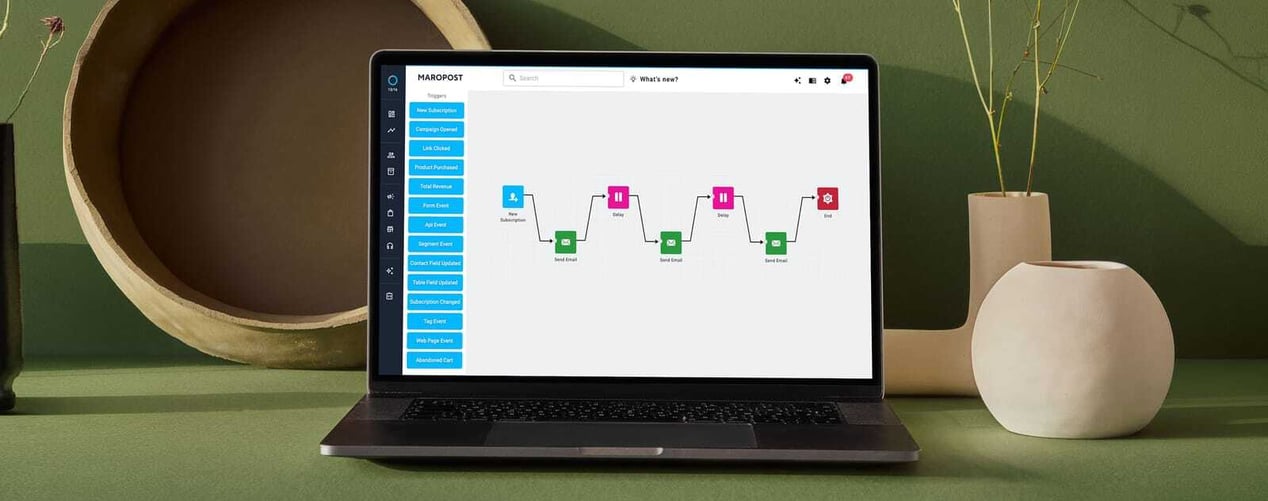
Journeys send automated messages to individual contacts after you set them up. A welcome journey can send introductory emails when a contact is added to selected lists. A nurture journey can send follow-up emails after a purchase or after someone has used a service.
Abandoned-cart emails are available as a journey pattern when at least one connected web store is in place. That template applies to Neto, Shopify, and ClickBank contacts. Other stores need a different setup.
Reporting, unsubscribes, and suppression
Campaign reports include a dashboard with delivered mail, opens, clicks, unsubscribes, and bounces, so you can see what happened and what to change on the next send.
Preference management lets contacts subscribe or unsubscribe from lists. When a contact chooses “Never email me again,” they're added to your Do Not Mail list and stop getting email from that account. A suppression list keeps a listed contact off future communications from that account. Hard-bounced invalid or nonexistent addresses can also be added to that list and excluded from later campaigns.
Shared or dedicated sending
When the sending program is ready, Maropost Marketing Cloud supports shared or dedicated sending. Dedicated sending is a paid option, and availability depends on the account.
How to choose email marketing software
When you compare platforms, focus on the capabilities your business will actually use. Make sure the software can create, target, send, automate, and measure, and that contacts and opt-outs are covered. Then decide which additional capabilities are worth having for the way your team works.
Your priorities may change as your email program grows, so consider what you need today alongside what you're likely to need next. That gives you a more useful basis for choosing than the length of a feature list.
Frequently asked questions
Look for the features that match the campaigns you will actually run. If you send mail, you need a way to create it, choose an audience, send or schedule it, and see what happened. If people can leave, you also need an unsubscribe that stays off later sends. Extra options only matter if your team will use them.
No. A team that only sends occasional campaigns can start with create, send, lists, opt-outs, and reports. Add targeting, personalization, and automation when those capabilities show up. Growing into capabilities is fine. Skipping consent is not.
Preview is a check on screen before anyone on the list receives the campaign. A test send puts a real copy in a few inboxes so you can see how it arrives. In Maropost Marketing Cloud, a test email can go to up to 30 recipients. Neither one is the live send to your list.
Only if they subscribed. Being stored as a contact, sitting on a list, or coming in from an import isn't permission. Look for software that shows subscription status and keeps people who opted out off later sends. In Maropost Marketing Cloud, “Never email me again” adds someone to your Do Not Mail list.
A list stores people you reuse. A segment groups people by rules you set for a specific send, using contact data or behavior. Keep people on lists. Use a segment when this campaign should go to only some of them. Being in a segment still isn't the same as being subscribed.
It's the smallest version, and it's useful when you actually have the name. Further personalization only helps if you store the field and the send can fall back when it's empty. Don't treat a promised open-rate or sales lift as the reason to buy the feature.
Not on day one. Journeys help when the same message should repeat, such as a welcome, a follow-up, or an abandoned path. If you only build campaigns manually, judge the campaign builder first. Abandoned-cart journeys in Maropost Marketing Cloud still need a connected store.
Revenue figures depend on product or order tracking, or on a store connection. Delivery, bounces, unsubscribes, and clicks can still show without that. Treat opens as a signal rather than a precise read count. For a deeper look at email marketing metrics, see 10 essential email marketing metrics and KPIs.
No. Those checks verify the sender. Permission, list hygiene, and what you send still matter. For the full sending guide, see How to improve email deliverability.
On a shared IP, sending reputation is shared with other senders. On a dedicated IP, the brand's sending reputation sits on its own IP. Dedicated IPs are paid IPs you opt into, so treat them as a sending choice rather than a shortcut to the inbox. For the full story, see how retail brands scale sending with a dedicated IP.
Not to cover the core capabilities. AI is worth checking when it helps you build segments or recommend products. In Maropost Marketing Cloud, that includes an AI segment builder you can prompt with keywords, and AI-powered product recommendations in email when a catalog is in place.
Yes, if you already have contacts another way. Connect a store or CRM when you want campaigns and reports to use the same records as orders, or when you need abandoned-cart sends. In Maropost Marketing Cloud, abandoned-cart journeys depend on a connected store.
SMS can sit in the same product and use the same contact records as email, so you aren't adding a separate messaging tool. It isn't on every account by default. Email lists and SMS lists are still separate list types on those records.